guides
Last update:11 May 2016
1 Available currencies: Credits, War Funds and Gold.
3 Buttons used to change the gameplay from action to strategy and vice versa.
4 A button used to enter the combat.
6 Your currently selected soldier’s name and class.
7 Ribbon development window.
8 Buttons used to change the currently selected soldier.
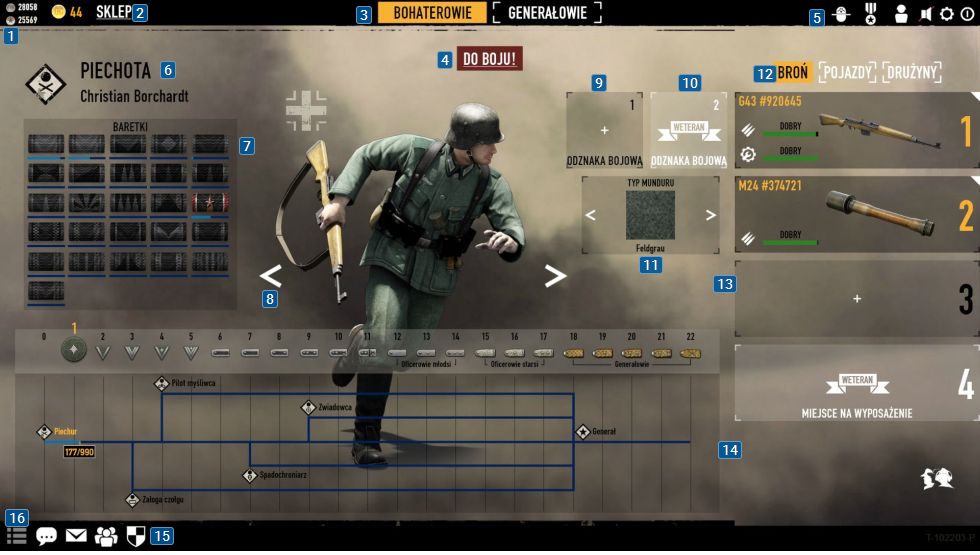
9 A slot in which you’ve got the option to insert a Combat Badge.
10 Additional slot for a Combat Badge - it requires you to have a Veteran status.
11 pop in of your soldier’s uniform.
12 Buttons used to change equipment tabs.
13 Currently selected gear.
14 Soldier development window.
15 Community options - inviting and writing to friends, global chat and team creation menu.
At the center of the screen there are buttons [8] used to change your currently selected soldier.
This site is not associated with and/or endorsed by the Square-Enix / Eidos or Reto-Moto.
All logos and images are copyrighted by their respective owners.